

Google launched Gemini in the Chrome browser's side panel
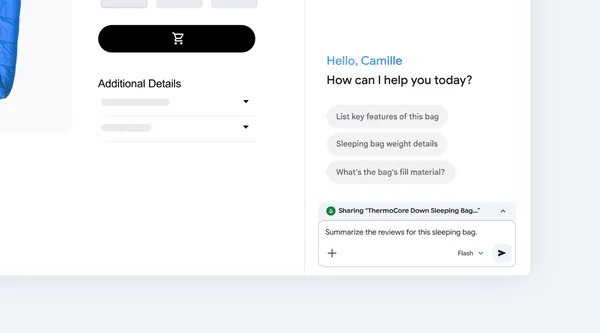
Google has made the Gemini model available in the Chrome side panel: by clicking the icon in the toolbar, users can summarize, compare, or explain page content without opening a new tab.
Google has made the Gemini model available in the Chrome browser's side panel. Users open it by clicking the Gemini icon in the toolbar, without needing to open a new tab.
In the panel, users can request a summary of a lengthy text, a comparison of product details, or an explanation of a complex topic in simple language. According to Google, the feature preserves the user's position on the original page, so there is no need to switch between windows.
The source material is a brief feature announcement and does not contain further details, such as the date of full rollout, availability for individual platforms, or possible differences compared to paid versions. See the source article for details.
Why it matters
The feature removes the need to switch between tabs when working with an AI assistant, speeding up common tasks such as reading documents or comparing products directly on any webpage.
Two audiences, two different impacts
What this means
For individuals
A user can have page content summarized, compared, or explained without opening a new tab and without losing their position in the original text.
For a business
Employees can process texts and websites faster directly in the browser without switching windows, which can shorten the time spent on routine reading and comparing information.
Productivity More business impacts →Check the original
Event sources
clearly official source · 1 publisher, 0 independent. We count feeds from the same owner only once.