

Google has launched a feature for importing chat history from other AI assistants into the Gemini product
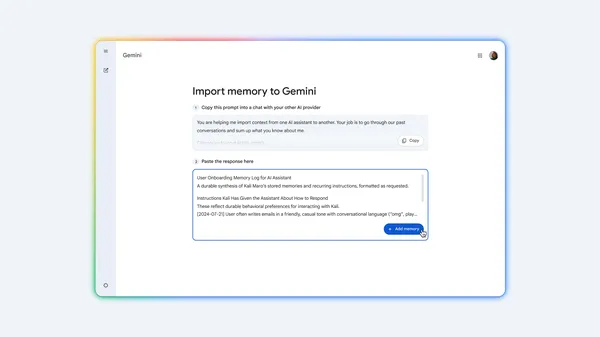
Google has launched a feature in the Gemini product for importing chat history and preferences from other AI assistants using a ZIP file export and a special prompt, intended to make switching easier without losing previous conversations.
Google, according to its announcement on the Gemini blog, has launched a feature that allows transferring chat history and preferences from another AI assistant into the Gemini product. The goal, according to the company, is to make switching to Gemini easier without losing existing conversations.
The procedure described by Google involves several steps: the user opens the import settings in Gemini, copies a prepared prompt, and pastes it into their existing AI tool to generate a summary of their preferences. This summary is then pasted back into Gemini. Next, the user exports a ZIP file containing chat history from their previous provider's account settings and uploads it in Gemini's settings, which according to the company lets them pick up conversations exactly where they left off.
The source does not specify which particular AI assistants can be imported this way, nor does it provide any information about regional availability, price, or limitations of the feature. For details, see the source article.
Why it matters
The feature lowers the barrier to switching from competing AI assistants to the Gemini product, since the user doesn't have to manually re-enter their preferences or lose access to earlier conversations. At the same time, it's a practical demonstration of Google's effort to make it easier for users to migrate from competing tools, which may influence the decisions of both individuals and teams when choosing a primary AI assistant.
Two audiences, two different impacts
What this means
For individuals
A user switching to the Gemini product from another AI assistant doesn't have to start from scratch and can carry over their existing preferences as well as chat history.
For a business
For companies considering changing the AI tool used by their teams, this feature offers easier migration of chat history and preferences, but it also means that company conversations from another tool will go through export and upload into the new environment, which needs to be taken into account in terms of data handling.
ProductivityCheck the original
Event sources
only one source so far · 1 publisher, 0 independent. We count feeds from the same owner only once.